A powerful no-code automation app for Android — far more flexible and customizable, with advanced triggers, actions and logic.
Run rules from volume and power multi-press + hold, motion and fold gestures, system events, time and location. Combine AND/OR conditions with if/else and variables, or let the AI helper build a rule for you. Lite for budget phones, Max with everything. Free, no account, no ads. Requires Android 8.0 or newer.
Installed an earlier test build? Uninstall it first — the signature changed. Export your rules before uninstalling. Install steps
What's new in 2.2
Max version 2.2
Lightning AI conversation history: every conversation (typed, voice and Live) is saved on your phone, newest first. Open any one and continue it, or delete it with a long press. Plus a “New conversation” button. Conversations are included in backup and export.
Faster Lightning Live: replies in under a second after you stop talking.
Audio stories with layered ambience and sound effects timed to the word, ducked under speech.
Voice games: timed riddles and quizzes, rock-paper-scissors.
Voice commands for Home and Recent apps.
Timers, games and effects only when you ask for them, never overlapping.
Automatic backup to your Google account (rules and settings, never API keys), plus settings export / import to a file.
Max version 2.0 — Lightning AI and Lightning Live
Lightning AI in three editions: Local runs on your phone without Internet, Advanced uses cloud AI, and Hybrid combines both. Choose the provider (Gemini, OpenAI or Groq) with your own key; one key per provider covers every feature.
Lightning Live: live voice conversations with AI. Turn on the camera or share your screen so it can see with you and describe things, and it picks up the tone of your voice (tone analysis can be switched off).
More voices for Lightning: Cartesia, Gemini TTS, ElevenLabs, the phone voice, a built-in eSpeak NG voice and downloadable offline neural voices. If the chosen voice fails, the phone voice takes over at once.
YouTube: say "play a video of …" or make a rule that plays a specific video.
Settings by voice: change Lightning's voice, speed, provider and model just by talking.
Phone control: turn any accessibility service on or off by name, uninstall apps (always with confirmation), Back / Home / Recent apps, and tap any on-screen item by name, even an English label said in Arabic.
With the screen reader: a "Toggle Lightning Live" rule action, also available from a gesture in Future Magic Screen Reader 2.0.
Lite stays at 1.2, unchanged and without Internet. Max 2.2 installs over the old version and keeps your rules.
1.2 — faster button response
Patterns run the moment they are complete: when no longer pattern with an enabled rule could still follow, the rule runs on the last release instead of after the quiet wait (e.g. "volume up ×2" or "power ×2" run instantly instead of after 0.7–0.9 s). Can be turned off in Settings to always wait the full window.
Volume and power key detection runs on a dedicated high-priority thread, and the rule starts straight from there without going through the UI, even when the screen is busy.
Much faster Shizuku key reading (a new event parser instead of regular expressions), and rules are kept ready in memory, so a press never waits for the database.
Motion triggers process sensor readings in batches, with the same results.
Same behaviour and settings; installs over 1.1 and keeps your rules.
Lite vs Max
Lite is light for budget phones. Max has everything in Lite, plus more. The two editions have different package names.
Feature comparison of the two editions
Feature
Lite
Max
File size
7.3 MB
28.1 MB
Minimum Android
8.0
8.0
Volume keys: multi-press, long press, press + hold, custom sequences
Yes
Yes
Power key: 2, 3, 4 presses and + hold
Yes
Yes
Instant motion & fold triggers
Yes
Yes
System, time and call triggers
Yes
Yes
"Notification received" from a chosen app
No
Yes
Geofences (enter / leave)
No
Yes
Fingerprint and voice commands
No
Yes
UI automation: tap, type, scroll, read screen text, tap recorder
Yes
Yes
Calls: reject and end
Yes
Yes, plus answer
Send SMS
No
Yes
Notifications: read, dismiss, auto-reply
No
Yes
Wi-Fi, airplane mode, location, NFC
No
Yes
System actions via Shizuku (optional)
No
Yes
AND/OR conditions, if/else, repeat, variables
Yes
Yes
22 templates, daily backup, run log
Yes
Yes
AI rule helper (your own key, optional)
No
Yes
Languages
Arabic (MSA) and English
MSA and English, plus a dialect picker for 20 Arab countries
Internet permission
None at all
Only for the AI helper, if you enable it
Features
Build a "rule": trigger → conditions (AND / OR) → actions in order.
⚡Triggers
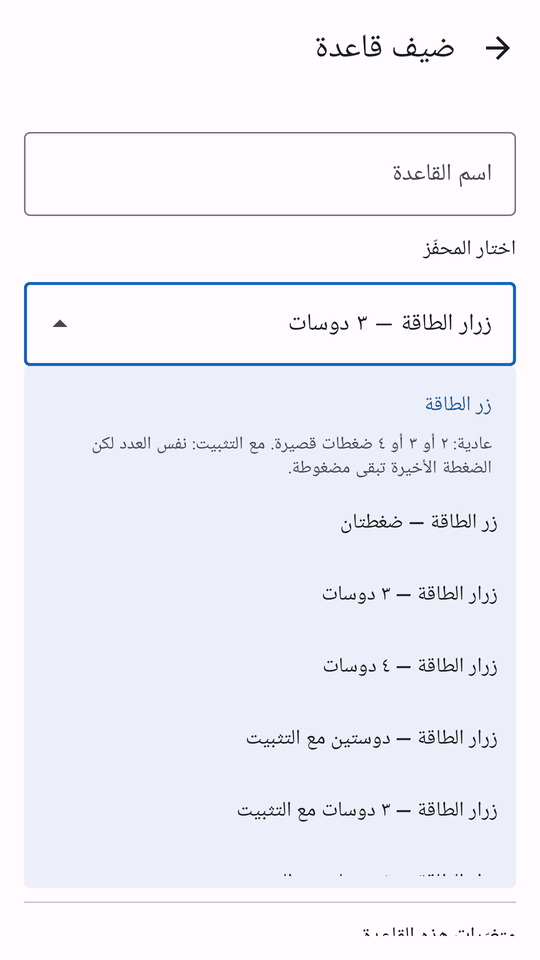
Volume keys: single, double, triple, long press, multi-press + hold, and sequences like ↑↓↑ or your own custom sequence (2–6 presses).
Power key: 2, 3, 4 presses and 2, 3, 4 + hold, with adjustable timing.
Instant motion & fold gestures: fire immediately when the phone enters a position, no key press needed: upside down, landscape right or left, back upright, flat screen up or screen down, and on foldables: fully opened, folded, or half open.
Time: specific time with weekdays, every N minutes, date, sunrise & sunset.
🔀Conditions, logic & variables
AND / OR conditions with groups.
If / else, repeat, wait until, stop rule.
Variables you can use inside any text, e.g. {battery}.
▶Actions
Call a contact or number, open an app, flashlight, vibrate, speak text, custom notification with buttons.
Sound: volume per stream, ringer mode (normal/silent/vibrate), reject or end a call.
UI automation: tap a text or the focused element, type text, scroll & swipe, read screen text into a variable, Back/Home keys, and a tap recorder.
Delays between actions, run another rule.
🧰Templates & tools
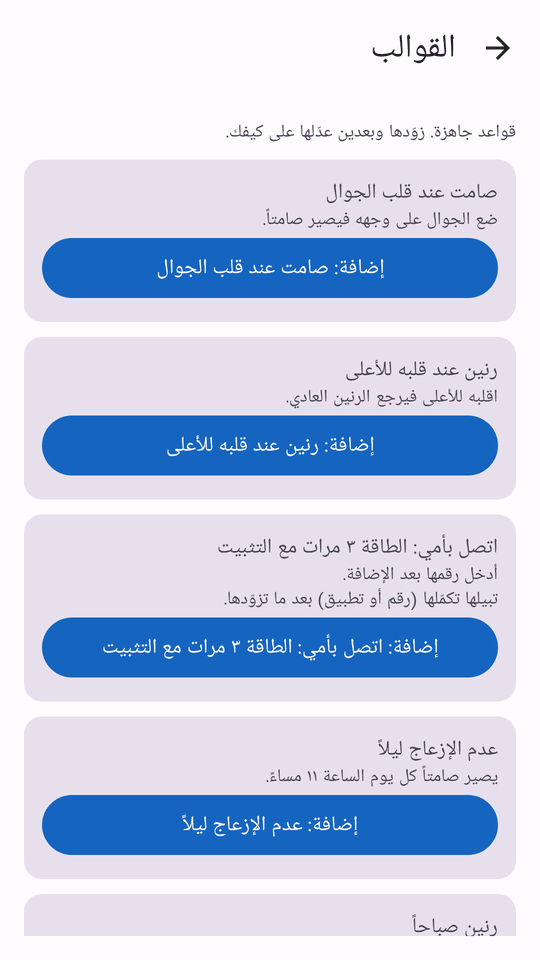
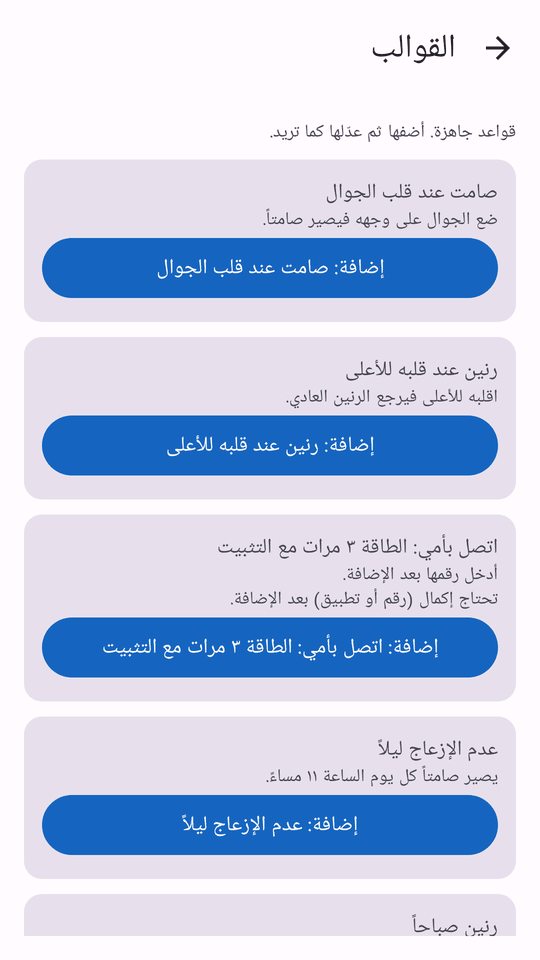
22 ready-made templates — add one, then adjust it.
Rule export/import, daily backup, run log, action test.
"Power key test" shows every press, its number and the result live.
Languages: Arabic (MSA) and English.
✨Max extras MAX
Shizuku (optional): lock / turn off screen, screenshot, force-stop an app, freeze apps, Bluetooth, Do Not Disturb, brightness, mobile data, shell commands, and system settings. With Shizuku, keys are read straight from the system for higher accuracy. The app works without it.
Voice: voice commands, and talking to the AI helper when you tap the voice button.
AI rule helper: type or say a rule in Arabic or English, e.g. "when I press power 3 times, call Mom", and the app builds it and shows it to you before saving. Uses an AI service key that you add yourself in Settings (optional).
Dialects: a dialect picker for 20 Arab countries (some new texts are still in MSA).
More triggers & actions: notification from a chosen app, geofence enter/leave, fingerprint, answer calls, send SMS, read / dismiss / auto-reply to notifications, Wi-Fi, airplane mode, location and NFC.
Shell commands and auto-reply are locked by default and only run if you enable them yourself, per rule.
Screenshots
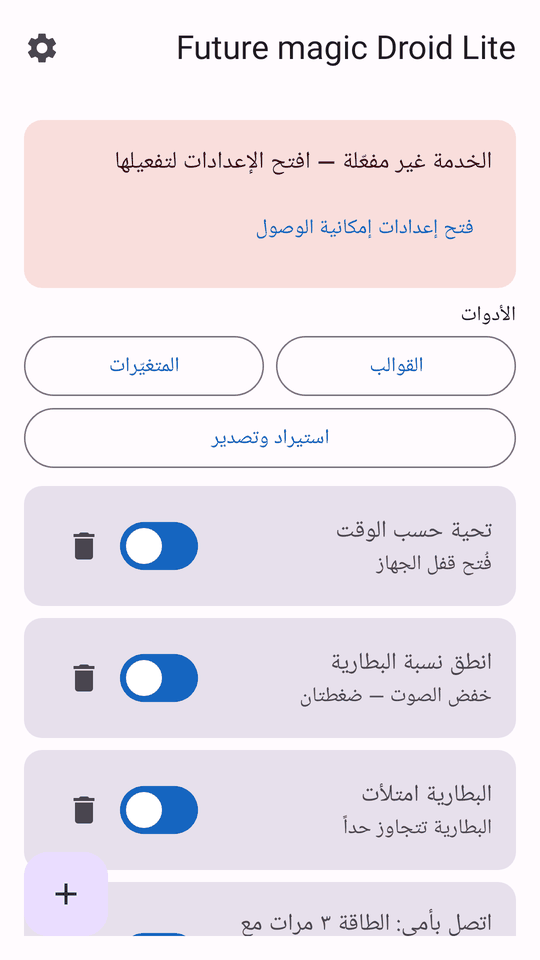
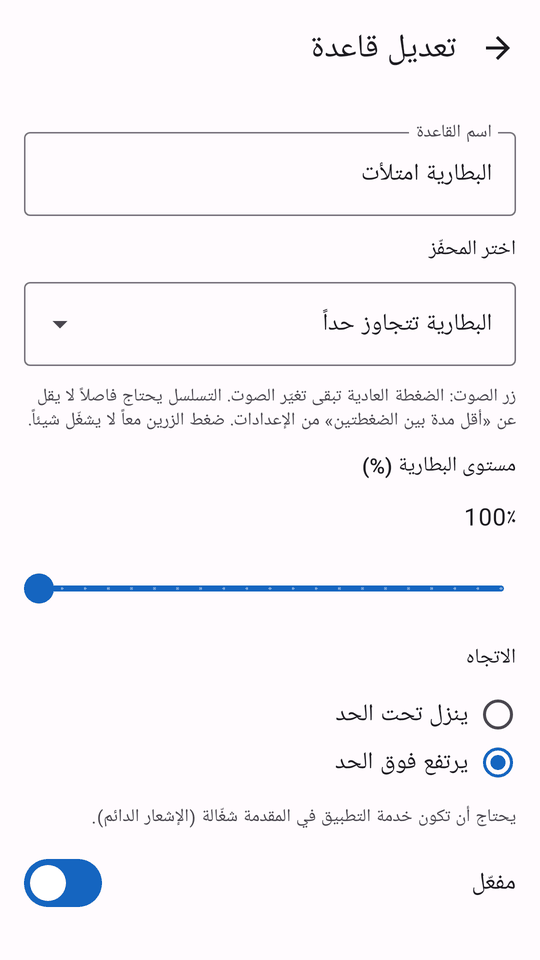
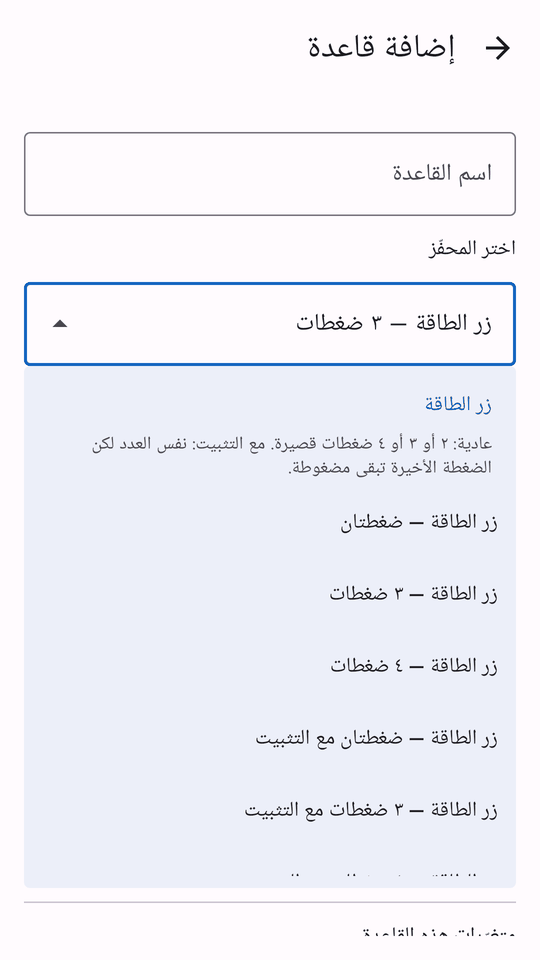
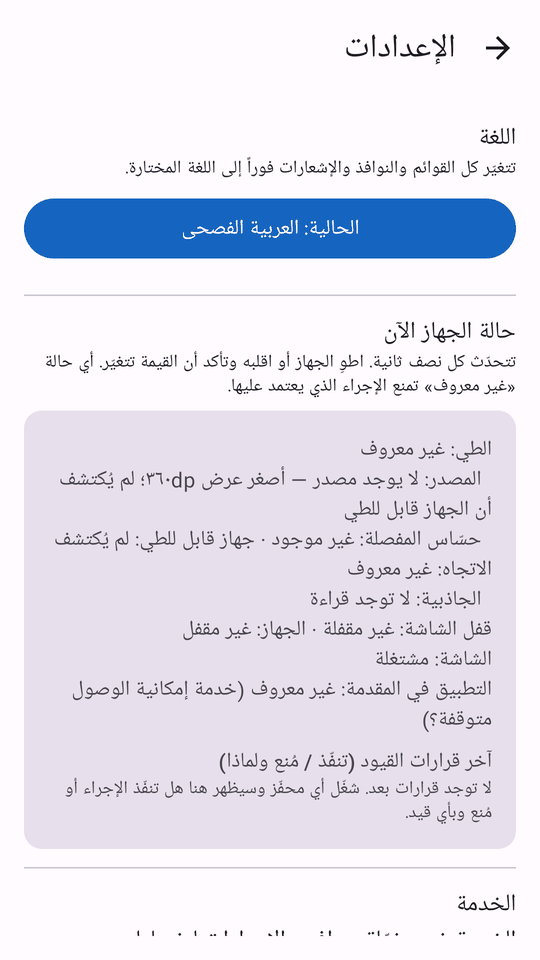
The screenshots show the app in Arabic. Tap any image to open it larger.
Max screenshots
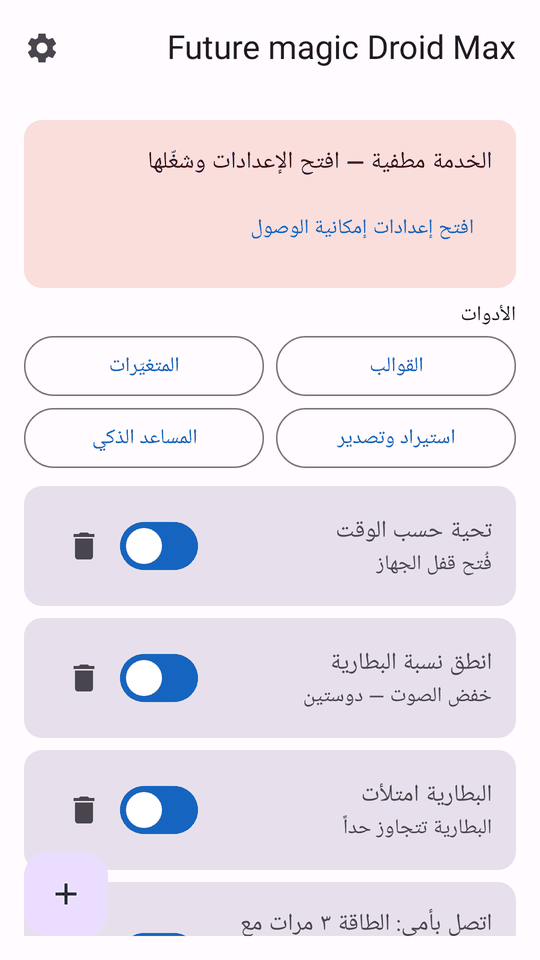
Home screen
Ready-made templates
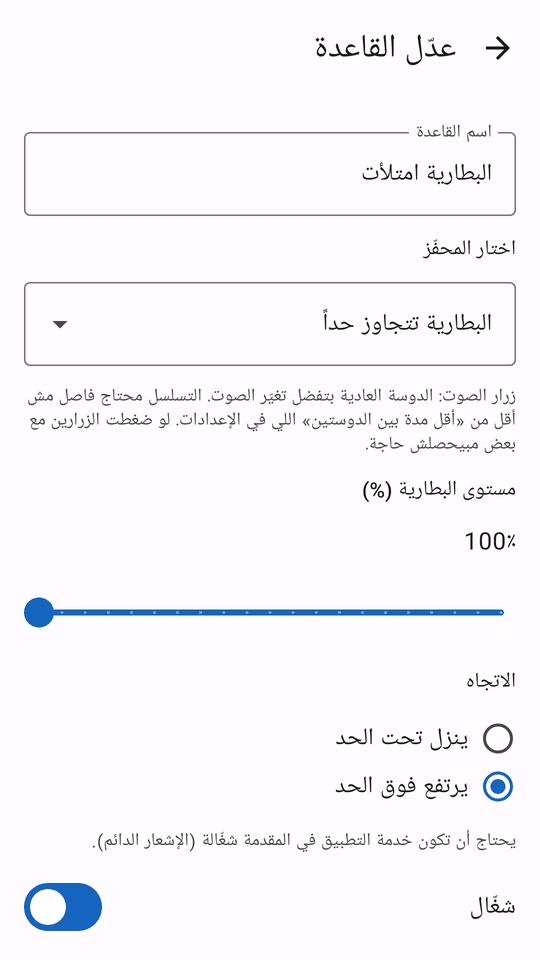
Rule editor
Trigger picker
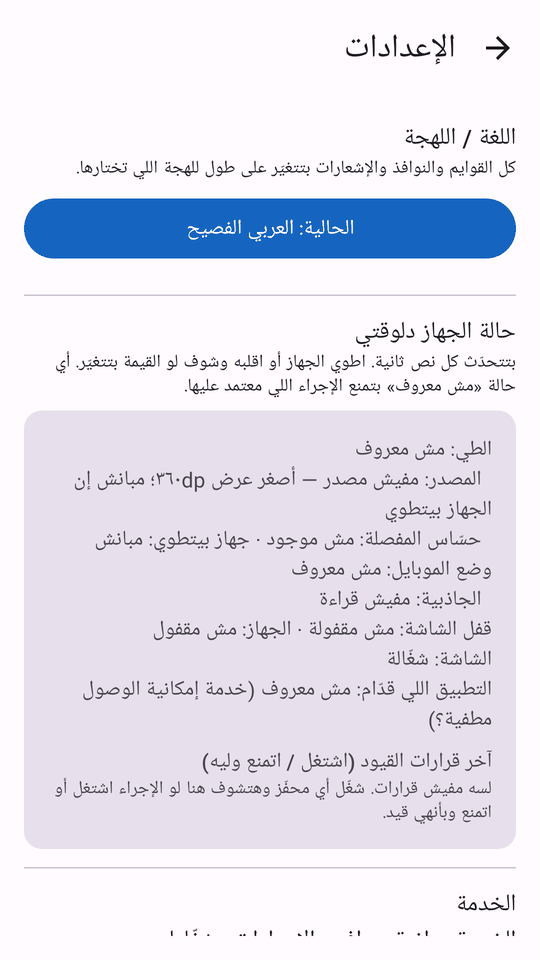
Settings
Lite screenshots
Home screen
Ready-made templates
Rule editor
Trigger picker
Settings
How to install
Note: if Android says the app "conflicts with an existing package", export your rules from "Import & export", uninstall the old copy once, then install this one and import your rules.
Pick an edition and download it
Tap "Download Lite" or "Download Max" at the top of the page. The file is saved to your Downloads folder.
Allow installing from unknown sources
Open the file from Downloads. Android asks you to allow the app you opened it from (your browser or file manager) to install unknown apps. Tap "Settings", turn on "Allow from this source", go back and tap "Install".
Turn on the accessibility service
Open the app. The home screen shows a "Service is off" card — tap "Open Accessibility settings", choose Future magic Droid under installed services, and turn it on. This service detects volume and power key presses.
On Android 13 and later, the system may block this for apps installed from a file. If so, open "App info", tap the ⋮ menu, choose "Allow restricted settings", then go back and turn the service on.
Optional for Max: install Shizuku
Shizuku is fully optional; you only need it for advanced system actions and direct key reading. Install it from its official source, start it, then approve when Future magic Droid Max asks for permission.
Start from a template
Open "Templates", add a ready-made rule, then adjust it. Each permission is requested only when you add a rule that needs it.
Permissions — honestly, and why
Each permission is requested only when you add a rule that needs it, and can be revoked at any time in Android settings.
Lite permissions
Accessibility service: to detect volume and power key presses, and for UI automation (tap, type, read screen text) only when you add a rule that does that. We do not log what you type and nothing leaves your phone.
Contacts and phone calls: for the "Call" action and picking a contact.
Phone state, call log, answer calls: for the "Incoming call" trigger and caller number, and to reject or end a call.
Location (approximate/precise): Android requires it to read the current Wi-Fi network name, and it is used for sunrise/sunset.
Camera: flashlight (in Max also the Lightning Live camera view, see below) — no photos are saved.
Installed apps list: to pick an app for "Open app" and the app opened/closed trigger.
Notifications, exact alarms, run at boot, foreground service, vibration, audio & Do Not Disturb settings, Wi-Fi and Bluetooth state: to run your rules on time and show the "listening" notification.
Internet: Lite does not even have the Internet permission.
Additional permissions in Max
Notification access: for the "Notification received" trigger and the read / dismiss / auto-reply actions. Notification content stays on your phone.
SMS (send): only for the "Send SMS" action, to the number and text you set in your rule. The app does not read your messages.
Location, including background location: for geofence enter/leave, the Wi-Fi network name, and sunrise/sunset. Your location is never sent anywhere.
Microphone: for voice commands and talking to the AI helper, only when you tap the voice button. Speech recognition uses your phone's speech service.
Fingerprint: for the "Use fingerprint" trigger (system prompt; the app never sees your fingerprint).
Internet: only for the AI features (rule helper, Lightning AI, Lightning Live, cloud voices), if you enable them with your own key.
Camera and screen sharing: only for Lightning Live, while you turn them on (a notification shows while they are in use).
Shizuku (optional): for advanced system actions and direct key reading, only if you install Shizuku and approve it.
Plus all the Lite permissions listed alongside, for the same reasons.
Frequently asked questions
Is the app free?
Yes, downloading from this site is free. No account, no ads, no tracking; the host only counts total visits and downloads.
Which edition should I pick, Lite or Max?
Lite is light for budget phones and includes volume and power key triggers, instant triggers, rules and templates. Pick Max if you need Shizuku, notifications, SMS, geofences, the AI helper or dialects. See the comparison table.
Does it work with a screen reader?
Yes. Controls are labelled and it works alongside screen readers such as TalkBack.
Why does Android warn about "unknown sources"?
Because the file comes from a website, not a store. Android shows this for every APK installed this way. You can confirm the file is intact by comparing its SHA-256 fingerprint with the one at the bottom of this page.
Do I need Shizuku?
No. Shizuku is fully optional and the app works without it. You only need it in Max for advanced system actions and direct key reading.
Does the app send my data anywhere?
No data is collected. Your rules, variables and backups stay on your phone. Lite has no Internet permission at all. In Max, the optional AI helper sends only the rule description you type or say, directly from your phone to the AI service you configure with your own key — never through any server of ours. Details in the privacy policy.
What does the AI helper need?
It is in Max only, and uses an AI service key you add yourself in Settings. Without a key it stays off, and the rest of the app works normally.
Can I install both editions?
They have different package names, so Android allows both. It is better to use one, so rules in the two editions don't compete for the same keys.
What is the minimum Android version?
Android 8.0 or newer, for both editions.
Licenses and eSpeak NG source
Future magic Droid Max 2.2 includes eSpeak NG version 1.52.0 (tag 1.52.0) under the GPL-3.0-or-later license. The library source is unmodified (no patches); it is built as the shared library libfmd_espeak.so together with a small JNI bridge.
 Future Magic Store